Showing posts with label Animation. Show all posts
Showing posts with label Animation. Show all posts
Thursday, June 25, 2009
More Short Tests
Here are some more short tests. I am shooting for one per day, about 60F. Rather than needling them, I am just getting them splined and moving on to the next. Shout out ideas for short mechanics tests, please!

Wednesday, June 3, 2009
Short Tests
As I am about to graduate AnimationMentor (wait- seriously?), I feel it is time to revisit some more foundational exercises not only to round out the demo reel, but also to increase my speed and proficiency of execution. Here is a quick loop, please let me know what you think!
Saturday, March 21, 2009
Lip Sync Practice- Kimono
**UPDATED
Got a slightly updated version of this clip, since my post this weekend.
Just a dialogue shot I've been working on recently for practice. Here I am working on speed and workflow, for the most part. I need to do a couple clean-up passes, particularly on the eyes.
Got a slightly updated version of this clip, since my post this weekend.
Just a dialogue shot I've been working on recently for practice. Here I am working on speed and workflow, for the most part. I need to do a couple clean-up passes, particularly on the eyes.
Wednesday, September 17, 2008
For Now
Here is the, "Final," of the exercise I had mentioned last week. Subject to change, although I want to dive into a few more practice projects before school gets going again.
Wednesday, September 10, 2008
Principles
You may have seen these before. It is pretty interesting to think about the persistence of vision, and which rules can be broken under what circumstances...
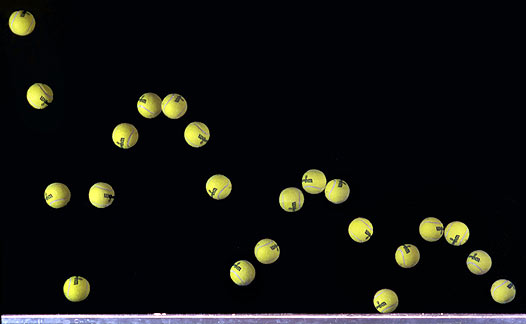

Here is a test I am working on with some friends. The trick to this test is: You may not use the Graph Editor. It is step-framed and keyed on every frame. This is a tremendous exercise and I highly recommend it!
Tuesday, July 8, 2008
Blocking
Hi all- here is the current body mechanics shot I'm working on... please crit away on anything and everything! At this point, I'm starting to pepper in breakdowns, so if you see gapping holes- call 'em out! Thanks in advance!
Saturday, June 7, 2008
To Polish
Time to start polishing this shot. Do you have any polishing tips or tricks of the trade? What do you look for in a super refined finished piece of character animation? Feel free to post or chat me :)
Tuesday, June 3, 2008
Surprise! More Hand Pose Tests
Hey all. This week our hand pose test is for surprise. What might you change about the following pose, and why?


Sunday, June 1, 2008
The 1st Dialogue Test- Moving to Spline
As promised, here is the IP of my first dialogue test with AM. At this point, I do not have the facial rig, so we are only refining the body acting while roughing in the eyes, blinks, and jaw positions. The primary thought behind restricting the facial expressions and lipsync is to nail down the body attitudes.
At this point, parts of the shot are moving to spline, while other things are still firmly rooted in linear. This week, I'll be finessing some hand poses and little things while adding keep alive and moving everything into spline.
At this point, parts of the shot are moving to spline, while other things are still firmly rooted in linear. This week, I'll be finessing some hand poses and little things while adding keep alive and moving everything into spline.
Thursday, May 15, 2008
Blocking Test
The clip has been selected and now we are onto the challenge of how to best stage it. Staging seems to be an issue which plagues me, so I thought I would do two rough passes and get some feedback before I commit to the shot.
Here's the deal:
A wide shot which establishes more context and setting
Now, personally, it strikes me as odd to have dialogue in an establishing or wider shot. It seems like you would have the character enter and hit the elevator button, then cut in a little closer for the dialogue. Particularly, since this is not a monologue. With dialogue which is directed at another character a closer camera seems more conversational. In this case however, we have specific references to the setting in the dialogue. Does that merit or necessitate the inclusion of setting in the shot? Might I include a bell or passport on the desk to help stage the closer shot? Another interesting question- would that be too similar to the shot as it stands in the film I borrowed the clip from, and when/how/why/is that wrong? This is a tricky dilemma- sound off!
Here's the deal:
A wide shot which establishes more context and setting
OR
A closer shot which is more conversational and allowing for more subtlety of facial actingNow, personally, it strikes me as odd to have dialogue in an establishing or wider shot. It seems like you would have the character enter and hit the elevator button, then cut in a little closer for the dialogue. Particularly, since this is not a monologue. With dialogue which is directed at another character a closer camera seems more conversational. In this case however, we have specific references to the setting in the dialogue. Does that merit or necessitate the inclusion of setting in the shot? Might I include a bell or passport on the desk to help stage the closer shot? Another interesting question- would that be too similar to the shot as it stands in the film I borrowed the clip from, and when/how/why/is that wrong? This is a tricky dilemma- sound off!
Thursday, April 17, 2008
Lotto_BlockingPlus
Hey friends
Here is the plussed blocking pass of my lottery shot. Plenty to work on here! (For instance, try using some IK arms next time.. hahaha good times!)
The assignment is to communicate an attitude and emotional change in 200-250 frames. Please share your ideas on clarity, timing and all the things you like or would change about this shot.
Here is the plussed blocking pass of my lottery shot. Plenty to work on here! (For instance, try using some IK arms next time.. hahaha good times!)
The assignment is to communicate an attitude and emotional change in 200-250 frames. Please share your ideas on clarity, timing and all the things you like or would change about this shot.
Sunday, March 23, 2008
Too Much!
Hi friends-
Please rip into this like there's no tomorrow.
I've learned a ton- primarily not to have TOO MUCH constant movement and action in a shot. You really have to think about pacing so you avoid the CONSTANT flailing. Hahaha... And the floaty-computer feeling...
Please rip into this like there's no tomorrow.
I've learned a ton- primarily not to have TOO MUCH constant movement and action in a shot. You really have to think about pacing so you avoid the CONSTANT flailing. Hahaha... And the floaty-computer feeling...
Sunday, March 9, 2008
Dumped ON
Here is the reblock of my last body mechanics shot of the term at AM. The assignment requirements are to push/pull a heavy object in 200-250 frames.
I'm really looking for a better camera angle- if I go to the other side so the viewer can see the truck approach, I lose the action and eyes of the character. If I stay here, the action and body mechanics are clear (which is the priority), but there is little set-up for the viewer. Where do you come down on this heated debate?
Also, where can I pick-up some time? I need to add a lot of breakdowns, clearly, but where can I maybe make some cuts to cushion the gag a little more?
I'm losing my eyes here, so I think I'll let it be for a day or so. Please let me know what you think!
Friday, February 29, 2008
Solved!
Oh snap you guys... Problem solving and troubleshooting are my favorite things to do! I'm so awesome. Hahahaha... Aw man...
Here is my solution to the blocking problem:
Block with the body translate curve (yellow triangle deal). THEN write down all the rotations of that curve- delete them. Leave all the poses as they are (even though, rotationally they will be off when you delete those main curve rotations). And then go back and paste in the corresponding rotations to the hips and lower spine ONLY.
To do this enables you to have an element of pose to pose, but then at some point, you delete part of that for straight ahead.
Hope this makes sense to anyone who is hurdling this challenge!
Here is my solution to the blocking problem:
Block with the body translate curve (yellow triangle deal). THEN write down all the rotations of that curve- delete them. Leave all the poses as they are (even though, rotationally they will be off when you delete those main curve rotations). And then go back and paste in the corresponding rotations to the hips and lower spine ONLY.
To do this enables you to have an element of pose to pose, but then at some point, you delete part of that for straight ahead.
Hope this makes sense to anyone who is hurdling this challenge!
Thursday, February 28, 2008
Blocking a Cross-Screen 180?
Dear friends in animation-
If you were attempting to block a shot, in which on F1 you are facing screen right, and F100 you are facing screen left (a complete 180 over the course of traveling the screen), how would you block the rotations? Would you use the Master Node? Plan to counter-animate? Because if you block those poses, how do you set the inbetween rotational poses?
If you were attempting to block a shot, in which on F1 you are facing screen right, and F100 you are facing screen left (a complete 180 over the course of traveling the screen), how would you block the rotations? Would you use the Master Node? Plan to counter-animate? Because if you block those poses, how do you set the inbetween rotational poses?
Thursday, February 21, 2008
What Happened to the Sock Hop/ Ice-Cream Social?
I'm approaching polishing on this hop shot- holler at your girl with your thoughts! It's time to put this one to bed!
Sunday, February 17, 2008
T....T-R-U....T-R-U-C-K, keep on truckin' all the way!
Heyo- fast times, we are in the refining process for the next body mechanics shot! So with this one, a couple of things are going on:
1. We have one more week to refine. I'm really hoping this will be polished, believable, and actually feel finished before it's ripped away from me.
2. My mentor challenged me to block in linear. It was awful. I learned a lot, but it really altered my workflow and transition from Blocking Plus to spline... in that, I feel I never really got to be in JUST Blocking Plus.
3. Keeping the body "alive" in subtle movements is much harder than I had anticipated, so now I see why my mentor recommends doing these exercises "dry," and without frills of acting or quick movements.
1. We have one more week to refine. I'm really hoping this will be polished, believable, and actually feel finished before it's ripped away from me.
2. My mentor challenged me to block in linear. It was awful. I learned a lot, but it really altered my workflow and transition from Blocking Plus to spline... in that, I feel I never really got to be in JUST Blocking Plus.
3. Keeping the body "alive" in subtle movements is much harder than I had anticipated, so now I see why my mentor recommends doing these exercises "dry," and without frills of acting or quick movements.
So there are spacing issues on the left leg on the way into the hop and out of the hop. Also I think the head still feels loose (IT'S SO BIG!). Any ideas?
Thursday, February 7, 2008
Revision Work 180
Hey all-
Fast times these days... Here is how the shot is revising. I'm starting my new mechanics test and will have that block up this week :)
Fast times these days... Here is how the shot is revising. I'm starting my new mechanics test and will have that block up this week :)
Saturday, January 26, 2008
Moving to Spline
This next week we'll start planning our new shots and finishing this one up. Here is my submission for critique. There are lot more tweaks for this, so lemme know what you see with those fresh and beautiful eyes of yours!
Thursday, January 24, 2008
180 Block Plus
Here we have a set of revisions from the last block. Some tweaks in foot placement and even the weight shifts. Also, I've begun adding in the Squash'n'Stretch and taken the Y-Trans to spline (as per Mentor recommendation at this point).
I think this will end up coming closer to spline as the week goes on and transition threw Block Plus over the weekend. Anyhow, time to step away and let it simmer... Holler your thoughts!
I think this will end up coming closer to spline as the week goes on and transition threw Block Plus over the weekend. Anyhow, time to step away and let it simmer... Holler your thoughts!
Subscribe to:
Posts (Atom)